
Utilisation#
Tous les algorithmes de HedgeTools sont accessibles via la classe HedgeToolsApp, qui initialise une QgisApplication.
Vous pouvez définir le paramètre debug_mode sur True pour afficher la trace d’appels complète en cas d’erreur.
De plus, le paramètre use_canvas permet d’ouvrir un canvas minimaliste dans votre IDE pour visualiser rapidement vos résultats.
Comme HedgeTools est installé dans le dossier des plugins QGIS, vous devez d’abord l’ajouter à votre sys.path Python avant de l’importer. Par exemple :
import sys
import platform
sys.path.append(".../python/plugins/")
# Access within QGIS with Settings > User profiles > Open active profile folder
#Then in the window : python > plugins
from hedge_tools.hedgetools_app import HedgeToolsApp

# HedgeToolsApp may need to access the processing library
# Usually it can be found in the following path :
if platform == "linux":
    processing_path = "/usr/share/qgis/python/plugins"
elif platform == "win32":
    processing_path = r"C:\OSGeo4W\apps\qgis-ltr\python\plugins\processing"

debug_mode = False
app = HedgeToolsApp(processing_path, use_canvas=True, debug_mode=debug_mode)
# Basic QGIS import to load our layers
from qgis.core import (
    QgsRasterLayer,
    QgsVectorLayer,
    QgsPointCloudLayer,
    QgsFeatureRequest
)
Il ne vous reste plus qu’à charger vos couches.
# Load a raster
mnh  = QgsRasterLayer("path/to/file.tif", "name", "gdal")

# Load a lidar tile
las = QgsPointCloudLayer("path/to/file.las", "name", "pdal")

# Load a vector file
hedge = QgsVectorLayer("path/to/file.gpkg", "name", "ogr")

# Load a specific layer inside a gpkg
polygon_lyr = QgsVectorLayer("path/to/file.gpkg|layername=polygon", "name", "ogr")
arc_lyr = QgsVectorLayer("path/to/file.gpkg|layername=arc", "name", "ogr")
node_lyr = QgsVectorLayer("path/to/file.gpkg|layername=node", "name", "ogr")
Les algorithmes gèrent les sorties temporaires de la même manière que QGIS, ou vous pouvez spécifier un fichier de sortie explicite.
Toutes les sorties des algorithmes sont renvoyées sous forme de dictionnaire
results = app.strata_proportion(hedge, mnh, bins=[0,5,7.5,10,15])
09:24:01 [INFO] Starting algorithm: STRATA PROPORTION
09:24:11 [INFO] Creating strata ...
09:25:39 [INFO] Computing strata statistics ...
09:25:51 [INFO] Formating output ...
09:25:51 [INFO] Completed algorithm: STRATA PROPORTION in 0:01:49
Les algorithmes gèrent les requêtes sur les entités. Lorsque plusieurs couches sont fournies, la requête s’applique à la première couche.
request = QgsFeatureRequest().setFilterFids([21])
results = app.topological_arc(hedge, request=request)
12:16:54 [INFO] Starting algorithm: TOPOLOGICAL ARC
12:16:55 [INFO] The following fields will be overwrite: pid
12:16:55 [INFO] Computing median axis ...
12:16:55 [INFO] Completed algorithm: TOPOLOGICAL ARC in 0:00:00
request = QgsFeatureRequest().setFilterExpression("$area < 1000")
results = app.topological_polygon(hedge, arc_lyr, node_lyr, request=request)
12:23:53 [INFO] Starting algorithm: TOPOLOGICAL POLYGON
12:23:53 [INFO] Computing topological polygons ...
12:23:53 [INFO] Creating cutlines ...
12:23:53 [INFO] Optimising cutlines ...
12:23:53 [INFO] Validating cutlines ...
12:23:53 [INFO]     Cutlines intersection correction ...
12:23:53 [INFO] Splitting polygons ...
12:23:54 [INFO] Updating PK/FK ...
12:23:54 [INFO] Completed algorithm: TOPOLOGICAL POLYGON in 0:00:00
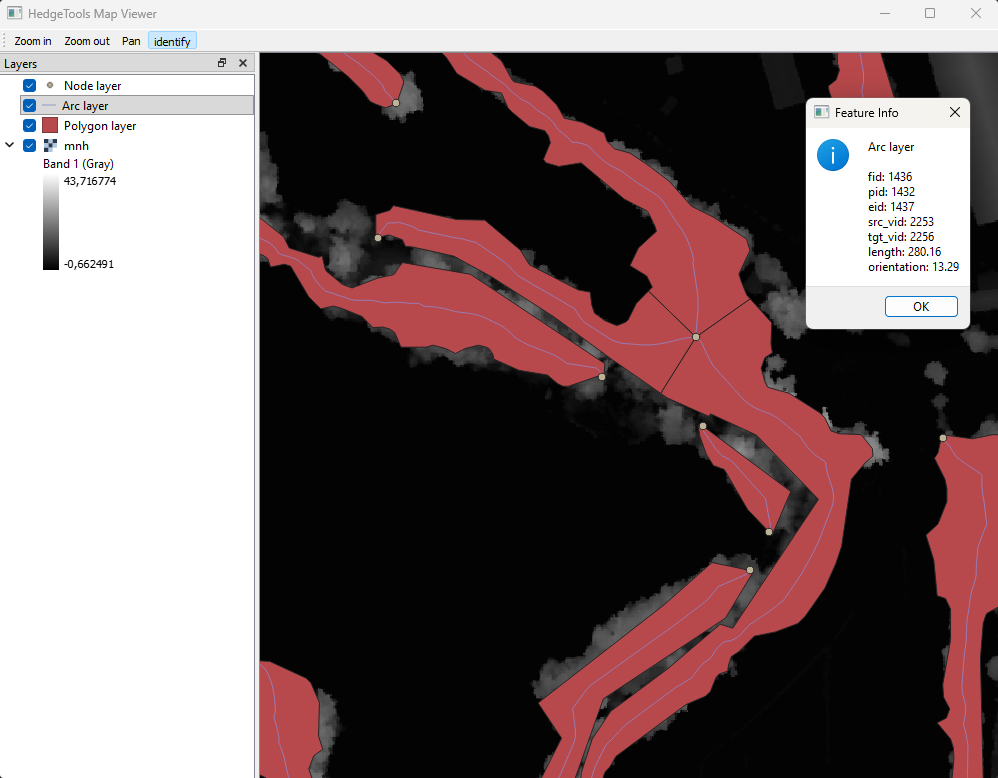
Vous pouvez charger un canvas minimaliste pour inspecter vos couches, en particulier les couches temporaires que vous ne souhaitez pas enregistrer puis charger dans l’interface de QGIS.
app.canvas.load_layers([polygon_lyr, arc_lyr, node_lyr, mnh])
app.canvas.show
from IPython.display import Image, display
display(Image(filename="../../images/canvas.png"))

app.exit